

Using Templates with YARPP 3
In this blog post I describe features in YARPP version 3.0. From those of you who were testing the beta, YARPP templates now go in your theme, and they must be of the form yarpp-template-….php.
If you have a YARPP support question not directly related to the templating feature, please use the YARPP support forums.
Version 3 of Yet Another Related Posts Plugin is a major rewrite which adds two new powerful features: caching and templating. Today I’m going to show you how you can use templates to customize the look of your related posts output.1
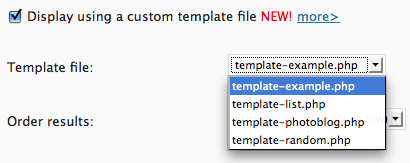
Previously with YARPP you were relatively limited in the ways you could present related posts. You were able to set some HTML tags to wrap your posts in and choose how much of an excerpt (if any) to display. This limited interface worked great for many users—indeed, these options still exists in YARPP 3.0. However, there’s also a new option for those of you who want to put your PHP skills to work and have complete control over your related posts display. The option will let you choose any files in the templates subdirectory of YARPP.
The structure of a YARPP template
Let’s take a look inside the example template, included with YARPP 3 (yarpp-template-example.php):
5 6 7 8 9 10 11 12 13 14 | <h3>Related Posts</h3> <?php if ($related_query->have_posts()):?> <ol> <?php while ($related_query->have_posts()) : $related_query->the_post(); ?> <li><a href="<?php the_permalink() ?>" rel="bookmark"><?php the_title(); ?></a></li> <?php endwhile; ?> </ol> <?php else: ?> <p>No related posts.</p> <?php endif; ?> |
There are two basic parts to this (and most all) YARPP template: (a) what you display when there are related posts and (b) what you display when there aren’t. We make this switch with the conditional on line 6. If there are related posts, we introduce an ordered list and use the while loop to loop over all the related posts. For each post, we use the snippet $related_query->the_post(); to load the appropriate post data, then print the line item.
You’ll notice that we’re using familiar template tags here such as the_permalink() and the_title(). If you’ve ever had to tweak or build a WordPress theme before, you’ll immediately feel at home. I’ll touch on this again later.
The power of PHP
One big advantage of this new templating system is that you can control exactly how the posts are listed, breaking out of all of the previous structural limitations. For example, in the template-list.php template, we put the information for each related post in an array and then concatenate the strings with implode. This way, we produce a comma-separated list for our readers without any stray commas before or after the list, which was impossible until now.
11 12 13 14 15 16 | $postsArray = array(); while ($related_query->have_posts()) : $related_query->the_post(); $postsArray[] = '<li><a href="'.get_the_permalink().'" rel="bookmark">'.get_the_title().'</a></li>'; endwhile; echo implode(', ',$postsArray); // print out a list of the related items, separated by commas |
You can also run any arbitrary PHP in the template file—even roll another WP_Query, as in the case of template-random.php, where a random post is returned when there are no related posts.
Familiar template tags
As mentioned before, the tags we use in these YARPP templates are the same as the template tags used in any WordPress template. In fact, any WordPress template tag will work in the YARPP Loop. You can use these template tags to display the excerpt, the post date, the comment count, or even some custom metadata. I’ve also written two special template tags which only work within a YARPP Loop: the_score() and get_the_score(). As you may expect, this will print or return the match score of that particular related post.
In addition, template tags from other plugins will also work. For an example, take a look at the yarpp-template-photoblog.php file:
8 9 10 11 12 | <?php while ($related_query->have_posts()) : $related_query->the_post(); ?> <?php if (function_exists('yapb_is_photoblog_post')): if (yapb_is_photoblog_post()):?> <li><a href="<?php the_permalink() ?>" rel="bookmark"><?php yapb_get_thumbnail(); ?></a></li> <?php endif; endif; ?> <?php endwhile; ?> |
In this template’s YARPP Loop, we use some template tags introduced by the Yet Another Photoblog plugin. If you have the Yet Another Photoblog plugin installed, you can use this template to display thumbnails of related posts in lieu of the titles. Notice that here we’re checking first whether each related post is indeed a photo post or not using yapb_is_photoblog_post() and then using the Yet Another Photoblog yapb_get_thumbnail() template tag to get the location of the thumbnail.
Templating in YARPP 3.0 enables the blog admin to uber-customize their related posts display using the lingua franca of PHP and template tags. Feel free to comment here with ideas, comments, and of course links to your YARPP-powered blogs. I look forward to seeing what the WordPress community does with this new feature!
-
For those of you interested in the WP and SQL voodoo used to make this happen, I’ve posted a more technical article. ↩
Related posts:
- Yet Another Related Posts Plugin 2.0
- Yet Another Related Posts Plugin
- Keep up with Yet Another Related Posts Plugin with RSS!
- Matt Mullenweg recommends YARPP on Tekzilla!
- Fixing Geshi on line 2132
Related posts brought to you by Yet Another Related Posts Plugin.
Tags: beta, HTML, PHP, template, WordPress, WordPress Planet, YARPP, Yet Another Photoblog
If you enjoyed this post, make sure you subscribe to my RSS feed (optionally with tweets from my Twitter)!
January 15th, 2009 at 3:42 pm
Mitcho, thanks for explaining this. I have been testing a number of related post plugins on my blog and I like yours the best because I can tweak the algorithm to suite my needs. I have been having problems with CPU usage, however, as I have 1500 posts and 250 tag names. I look forward to seeing how the caching feature improves things.
For others looking to test this, you might try using a plugin called WP-Tuner. It has been helpful in identifying which plugins are creating difficulties or conflicts.
One question I have is whether Simple Tags, with the related tag feature turned off will conflict with YARPP. Let me know, Mitcho, because I like Simple Tags for its tag management and mass editing capabilities.
January 16th, 2009 at 12:07 am
@Edward - I have to admit, YARPP < 3 has been a nightmare for some larger / higher-traffic blogs, really making this caching feature a necessity. I hope you can try out the beta and verify that the caching works well.
As for Simple Tags and YARPP… while I don't use Simple Tags myself, I do know users who use YARPP with Simple Tags (with the related tag feature off). I don't know anyone who's tested it with YARPP 3 yet, but I don't see why it would be a problem.
January 16th, 2009 at 2:33 pm
Hi very noce work i'm now testing beta and translating it into french
Regards
January 17th, 2009 at 8:45 am
Alain, I'm sorry but we already have a French translator. If you email me I'll let you know if I ever need someone else to take over. Merci. ^^
January 17th, 2009 at 12:34 pm
This release of YARPP is a perfect fit for the Yet Another Photoblog (YAPB)-plugin. I did a fast, rough implementation on my own danish blog (http://tegneblog.dk/2008/kvinde-med-haandtaske.ht...I have been waiting for a thing like this for ages. @Mitcho - Thank you again!
January 23rd, 2009 at 4:28 pm
I use your new YARPP to call plugins and have a little error, after trial and error i found the problem, i change the php code from <li><?php yapb_get_thumbnail(); ?></li> to <li><?php echo yapb_get_thumbnail(); ?></li>
and it works
sorry for my bad english
January 23rd, 2009 at 4:35 pm
Thanks alta. I'll make sure to put that fix in the next beta.
January 23rd, 2009 at 4:53 pm
I have been using the caching feature and it works incredibly well. This is a great improvement. The initial caching took about 20 minutes for the 1500 posts. Afterward everything was as it had previously been. But now CPU usage is way down and it works marvelously. I have seen a good increase in my pageviews per user as a result. Thanks for the upgrade. I can't say enough about it.
January 23rd, 2009 at 10:27 pm
I'm glad to hear that Edward! Thanks for letting me know.
January 31st, 2009 at 2:53 am
Hi Mitch,
We love your plugin, it gives the best results of any of them, and we have the latest beta sucessfully working on our site
February 2nd, 2009 at 6:20 am
Just testing the beta out now Mitcho and I noticed that the introduction message says "Thank you for upgrading to YARPP 2. YARPP 2.0 adds the much requested ability to limit related entry results by certain tags or categories. 2.0 also brings more fine tuned control…"
You might want to change this to YARPP 3
February 2nd, 2009 at 6:32 am
On WP 2.6.5 I am getting this error: "The YARPP database has an error which could not be fixed." The cache is also not being built. Is YARPP 3 written for WP 2.7 only? I hope not because I hate 2.7 and will not be upgrading.
February 4th, 2009 at 4:14 pm
Thanks for trying out the 3.0 beta. I just released a new version (3.0 beta 2) which fixes that first message issue, and may (perhaps) fix the second. I'd appreciate your feedback.
February 11th, 2009 at 4:40 pm
Great plugin, but any possibility of showing a thumbnail of the post as an option? Pull first image in post and cache all thumbs, give options for 32px/64px images. Images speak SOOO loudly! Thanks
February 13th, 2009 at 2:37 am
Hi Richard,
This is indeed possible with a custom theme… you'd have to make a template file which gets the content and parses it to find the first image… this should not be hard, using a regular expression.
My plan with the templating feature is to give the user enough freedom to display their results exactly as they like, so I don't have to add such options into YARPP itself. The more options, the harder to use the plugin becomes.
February 25th, 2009 at 2:32 pm
Don't work filters options:
$related_query->query("orderby=name&order=desc&limit=3"); if ($related_query->have_posts()): while ($related_query= new WP_Query()) : $related_query->the_post();
or
$related_query= new WP_Query("orderby=name&order=desc&limit=3"); if ($related_query->have_posts()): while ($related_query= new WP_Query()) : $related_query->the_post();
Example full use (but don't work):
If ($related_query->have_posts()): While ($related_query->have_posts()) : $related_query->the_post();
February 26th, 2009 at 1:32 am
Hi Kyhos—you're right. You can't use a query string to filter your results in a YARPP template. What are you trying to do?
March 7th, 2009 at 8:51 pm
Thanks for releasing this beta! Certainly helps in making my related posts looking way better.
March 22nd, 2009 at 8:44 am
Thanks Aaron. It's corrected in beta 5.
March 25th, 2009 at 2:44 am
I've noticed two things. First in Beta 5, I cannot select an template to use; the select menu is blank. In Beta 4, my posts do not relate without me manually rebuilding the cache. What do you think the problem is?
March 25th, 2009 at 2:59 am
James, please take a look at the install instructions file. You most likely don't see any templates because you haven't copied the yarpp-templates folder to the right location yet (with beta 5, that's in <code>wp-content/</code>). As for the cache, you must either build the cache yourself or else turn on the "cache on the fly" option which is safe for most small to medium size blogs.
March 28th, 2009 at 2:39 am
Hello, I've got the beta 5 installed and the templates are displaying, however I'm trying to get the custom image to display but it does seem to process the following fucntion: <?php echo $custom_field; ?>
Basically that code should echo the custom image url of my post. It works in other places in my WP loop, but it just disappears when I place it in yarpp template file.
March 28th, 2009 at 2:52 am
Hi Matt—I don't think the $custom_field method is supported in general… are you using some plugin to enable that?
The supported custom field methods are described here… for example, please use the <code>get_post_meta()</code> function.
March 28th, 2009 at 11:14 pm
So for every new post you create it wont' be included in the cache until you manually rebuild? Or if you do the compute on the fly?
March 29th, 2009 at 12:19 am
James, great question. No, for any post which you write after YARPP is activated, it will compute its related posts cache entry whenever you save that post/page. I suppose that should be explained in the FAQ or something…
March 29th, 2009 at 12:28 am
Then what does the cache on the fly do differently?
March 29th, 2009 at 12:45 am
James - the "on the fly" caching kicks in when a viewer accesses a page whose related posts haven't been cached. If the option is off and an uncached page is visited, they will see "no related posts."
If you have built your related posts cache once, then it shouldn't matter whether you have the on the fly cache on or not.
April 6th, 2009 at 3:25 am
I loved the plugin. So far i hasnt seen any bug in my blog. The plugin is working perfectly!
April 19th, 2009 at 9:15 pm
This is marvellous! I'm so glad there are talented people out there creating this!
I thought getting related thumbnails presented nicely was going to be a nightmare - this template system is great, I managed to re-use some of my archive page to keep the look consistent with the rest of the site.
So, thank you again!
April 22nd, 2009 at 3:48 pm
Good job, your plugin is fantastic- the work that's gone into it (backend is near perfect) makes me happy to be in the WordPress Community! Your plugin has made my blog work again, and given me inspiration to sort out my own plugin. Thank you!
April 24th, 2009 at 12:41 pm
Is there a way to display thumbnails without the YAPB plugin? How could i accomplish this
April 26th, 2009 at 6:31 am
I know there are other plugins which create thumbnails of images in posts, e.g. the Post Thumbs plugin. Template tags from those plugins should also work in a YARPP template. ^^
April 26th, 2009 at 5:30 pm
Okay, I updated and now I just get this: wp-content/plugins/yet-another-related-posts-plugin/magic.php on line 300. I've configured according to your instructions. Help? Also, how will this work with the WP Mobile Edition plugin? Thanks.
April 26th, 2009 at 8:49 pm
Same problem here… I updated to the latest version this morning and now get this error: wp-content/plugins/yet-another-related-posts-plugin/magic.php on line 300. (Things were working fine before.)
I went in and looked at line 300, but I'm not exactly sure what the fix is. Any help is much appreciated. Thanks!
April 26th, 2009 at 10:50 pm
Hello, Thank you for your script, it's working fine. I'm still searching to put the thumbnail next to the entry. Can you help me ? Thanks Julien
April 27th, 2009 at 3:16 am
Patrick, Alison, I believe I've fixed this issue with version 3.0.1. Please try it out.
April 27th, 2009 at 3:19 am
Hi Julien—as I said to Sven above, you may want to check out the Post Thumbs plugin.
April 27th, 2009 at 7:31 am
Same problem as Patrick D. I have the flexibility theme and this update doesn't seem to work with it.
How do we fix it?
April 27th, 2009 at 7:40 am
Please note that I already replied to Patrick D above. This is fixed in the patch, version 3.0.1. Please get it from wordpress.org.
April 27th, 2009 at 12:08 pm
It did work. I had to do the 'save options' thing even without changes, but it is working again. Thanks.
April 27th, 2009 at 12:08 pm
It did work. I had to do the 'save options' thing even without changes, but it is working again. Thanks.
April 27th, 2009 at 3:48 pm
Yes, I know but I use one other plug to put thumbnail on my website and I'm not to install one other plugin. I have more of 150 articles and few autor and I don't think that it's will be easy to change all. Unfortunatly, I don't know php and I'm not able to joint the thumbnail in your template code. Anyway, thank a lot for your code Julien
April 27th, 2009 at 9:34 pm
Hello ! I search, I search and I succed to put the thumbnail but it miss someting, the images are not resizes, they are full resolution. Here is my code, can you help me please : <?php /* Example template Author: mitcho (Michael Yoshitaka Erlewine) */
?><h3>Related Posts</h3> <?php if ($related_query->have_posts()):?>
<?php while ($related_query->have_posts()) : $related_query->the_post(); ?> <div class="post-thumb"><?php show_thumb($options['GTwidth'],$options['GTheight'],$options['crop'],$options['quality']); ?></div>- <?php the_title(); ?><!— (<?php the_score(); ?>)—>
<?php endwhile; ?>
<?php else: ?>
No related posts.
<?php endif; ?>
April 29th, 2009 at 12:34 pm
Thank you for your plugins, but i have some problem with display thumbnail: http://www.hurl.ws/2dxd
what could the problem be? Thanks
April 29th, 2009 at 2:49 pm
Sorry, that seems like a YAPB problem… I don't think I can help you. :/
May 1st, 2009 at 5:41 pm
HI Mitcho,
Thanks a lot for this plugin. I've tried many other related post plugins but I like your's the best and it works great.
I never had any problems with it.
Daniel
May 11th, 2009 at 5:22 am
I'm really enjoying this plugin, after I get all the basic tweaks finished up I will start looking for ways to utilize the templating system.
Thanks for such great work … Scott - @ScottProck
May 16th, 2009 at 8:58 am
it would be wonderful if you could post a way to insert a thumb in the plugin…i think many people are waiting to be able to do that without being ph experts. help!!!!1
May 16th, 2009 at 10:21 am
Do you mean you'd like to display thumbnails of related posts? You can use template tags from plugins in your YARPP templates.
Have you tried the Post Thumbs plugin? You can use those template tags in your YARPP template.
May 17th, 2009 at 11:59 am
Thanks for a nice plug-in and keep it up.
May 19th, 2009 at 1:30 pm
Thank you for your script, it's working fine.
May 21st, 2009 at 6:17 pm
[…] The display can also be changed by editing the YARPP templates. See tutorial here. var addthis_pub = ‘flatwaremediacom’; var addthis_language = ‘en’;var addthis_options = ‘email, favorites, digg, delicious, myspace, google, facebook, reddit, live […]
May 30th, 2009 at 5:27 am
This plugin is so amazing. I have been using similar post plugin for sometime now but after moving to YARPP, I am so relaxed. Its so easy to use and it has all the features I wanted
Thank you so much.
June 6th, 2009 at 4:14 pm
Ok. this is god but what do I do if I want to show related posts somewhere else like in the sidebar?
June 7th, 2009 at 12:24 am
You can customize the display to add some CSS tags which can then be used to place the content on the page as you see fit. If you need the related posts display in a different place in the page, see the manual installation page which will explain where to put the display in a different part of the page.
June 7th, 2009 at 9:24 am
Great, Thank you very much. Much appreciated.
June 13th, 2009 at 4:25 am
Mitcho,
Been using YARPP for about a year. Love the new cacheing feature. One question about how it works. After I build a cache, when new posts are created on my blog, will their related entries be cached automatically? It seems like this should be happening, but I can't tell if it is.
June 13th, 2009 at 4:46 am
John, yes it does. It also must update the caches of posts related to it, so here's what happens.
You make a new post, post 100. It computes its related posts, and learns 100's related to 12, 52, and 93. It then goes and rebuilds the caches for 12, 52, and 93 as well. In this way, if 100 ought to show up in those previous articles' related posts lists as well, it will do that.
In this way, only under very rare circumstances will you have to manually rebuild the cache. Thanks for the great question.
June 13th, 2009 at 7:19 am
That's great. Thanks for making this.
June 13th, 2009 at 3:16 pm
[…] I recently noticed that some of my blog posts, most notably my Templates in YARPP 3 article, was producing a PHP error: […]
June 22nd, 2009 at 4:13 pm
I really loved your plugin just installed it on my website. I hope it will generate great results. Thanks for the nice plugin.
June 25th, 2009 at 12:43 pm
Thank you, works fine, i like this Plug-In - Great work!
July 7th, 2009 at 5:50 pm
[…] Подробнее про шаблоны можно прочесть здесь: http://mitcho.com/blog/projects/yarpp-3-templates/ […]
July 18th, 2009 at 3:40 am
i'm still not understand how to custumize it
July 27th, 2009 at 2:27 pm
Hey, Some how I found a snippet of code that would actually display the excerpt within the YARPP templates. I've since re-installed and lost the snippet… It did not seem complicated but I can not remember what it was. anyone doign somethign similar and would like to share?
July 27th, 2009 at 5:12 pm
Try the_excerpt(). You can check out the full list of template tags here: http://codex.wordpress.org/Template_Tags
July 27th, 2009 at 7:19 pm
so I am FAR from a coder…. barely even one in training!
Like this? (in front of href?) I didn't have any luck with this method, see http://plramsey.com/smart-business/management-les...
<?php if ($related_query->have_posts()): $postsArray = array(); while ($related_query->have_posts()) : $related_query->the_post(); $postsArray[] = '<?php the_excerpt(); ?> '.get_the_title().'<!— ('.get_the_score().')—>'; endwhile;
echo implode(', '."n",$postsArray); // print out a list of the related items, separated by commas
else:?>
No related posts.
<?php endif; ?>
July 27th, 2009 at 8:27 pm
For starters, it would be easier if you were to use yarpp-template-example.php rather than yarpp-template-list.php…
July 28th, 2009 at 1:02 pm
like this?
July 28th, 2009 at 4:26 pm
yeah… does it work?
August 8th, 2009 at 10:20 am
Can I exclude related posts from showing up in a particular category. I have a category for asides, which appear in the sidebar, and don't want related posts to appear there.
August 9th, 2009 at 2:29 am
You should be able to do this by manually entering related_posts() in your template and wrapping that in a conditional:
if (!in_category('no-related-posts')) related_posts();
Hope that works.
August 12th, 2009 at 2:37 pm
To michael - you go to the wordpress settings - related posts (yarpp) - "the pool" and you choose categories over there.
August 19th, 2009 at 2:18 pm
Thanks for the great plugin and now it is even more useful
August 21st, 2009 at 10:37 am
[…] templating mechanism. More information is available in this tutorial. […]
September 13th, 2009 at 8:11 am
i want to manually place related posts in single.php, can anyone give me the code to do so.
I tried everything but nothin seems to work.
September 13th, 2009 at 2:33 pm
Sam, there are instructions here but the bottom line is that the code you want is <code>related_posts()</code>. Put that PHP code in your single.php Loop.
September 19th, 2009 at 8:05 am
Hi, Nice post! You have worked hard on jotting down the essential information. Keep sharing the good work in future too.
September 23rd, 2009 at 3:15 am
I think I found a bug in YARPP 3.0 beta 4 if you haven't already found it. If you look at your includes.php
September 23rd, 2009 at 3:17 am
Every other mention of this table in your plugin includes the prefix, except for the create. Changing the table create statement to:
{$wpdb->prefix}yarpp_related_cachefixed everything for me.September 29th, 2009 at 7:15 am
Excellent plugin - thanks. My pHp skills are somewhat limited. Is there a way to show the related posts and sort them by category putting 'Category' into some kind of format? Thanks again.
September 29th, 2009 at 4:40 pm
Unfortunately there's no simple way to do that with YARPP at this time.
September 30th, 2009 at 8:31 pm
I tried to use the related list in a box of a landingsite plugin (only called if the visitor was comming from a search engine).
However if I do that the webpage stops at the point of the first php code of this plugin. I used only this :
<?php if ($related_query->have_posts()):?>
<?php while ($related_query->have_posts()) : $related_query->the_post(); ?>- <?php the_title(); ?>
<?php endwhile; ?>
The code is inside the loop. Funnywise, at the end the related list works perfectly.
September 30th, 2009 at 8:31 pm
I tried to use the related list in a box of a landingsite plugin (only called if the visitor was comming from a search engine).
However if I do that the webpage stops at the point of the first php code of this plugin. I used only this :
<?php if ($related_query->have_posts()):?>
<?php while ($related_query->have_posts()) : $related_query->the_post(); ?>- <?php the_title(); ?>
<?php endwhile; ?>
The code is inside the loop. Funnywise, at the end the related list works perfectly.
October 2nd, 2009 at 6:00 am
Hi, This is great work and very good information. This post will really help beginners, although it is basic but, it will help others in great deal in future.
Buy Dissertation
October 2nd, 2009 at 6:00 am
Hi, This is great work and very good information. This post will really help beginners, although it is basic but, it will help others in great deal in future.
Buy Dissertation
October 5th, 2009 at 6:38 pm
Matthias, inserting the template code directly will not work. You must simply insert <?php related_posts() ?> in your template code and then edit the display using a YARPP template (as described in this post).
October 6th, 2009 at 11:43 am
I can't see my templates files. It's blank. What is the problem? ( I have latest version installed )
October 6th, 2009 at 7:15 pm
This is a very interesting plugin and am going to use this instead of my old plugin
Thank you very much for creating it !
October 12th, 2009 at 2:39 am
Hi, Great plugin.
I had a couple of issues setting it up, but now it works perfectly Very useful Love it
October 13th, 2009 at 4:08 am
Have been using this plugin since the first time blogging. The custom template feature is really great. Really appreciate for the hard work. Thanks
October 22nd, 2009 at 8:05 pm
Thanks, good works… bravo!
November 3rd, 2009 at 8:55 pm
I have a wordpress site with constant feed of shopping items. I would like a side bar widget to show seasonal offers such as Christmas product posts. Is there a plugin or bit of code to achieve this easily?
November 4th, 2009 at 5:50 pm
There may be, but YARPP would not be what you want. Try checking http://wordpress.org/extend/ .
November 4th, 2009 at 5:50 pm
Is it one of the bundled templates or a custom one?
November 5th, 2009 at 5:35 am
[…] Templating: New in 3.0! A new templating system puts you in charge of how your posts are displayed. […]
January 10th, 2010 at 5:40 am
[…] Templating: New in 3.0! The YARPP templating system puts you in charge of how your posts are displayed. […]
May 22nd, 2010 at 5:11 am
[…] Templating: New in 3.0! The YARPP templating system puts you in charge of how your posts are displayed. […]
May 22nd, 2010 at 4:23 pm
I am trying to use filezilla to move the template files to the wordpress theme folder. Will you please explain this in detail as if you were trying to teach a child? I don't get it. I have tried uploading the files from my desk top, I have tried dragging them directly from the right side of filezilla into the wordpress theme. I have double clicked on that wordpress theme to find another file with the theme's name on it and tried uploading and dragging it into that file and nothing makes a difference, except I now get this message:
No YARPP template files were found in your theme (/home/kurtwill/public_html/myssite.com/wp-content/themes/republic/republic) so the templating feature has been turned off.
Kurt
May 24th, 2010 at 2:21 pm
What you want to move to your theme’s folder are the files which are named
yarpp-template-....phprather than the yarpp-templates folder itself. I hope that helps.May 25th, 2010 at 3:40 am
[…] 修改说明(不过是英文的,英文好的朋友可以去参考一下):http://mitcho.com/blog/projects/yarpp-3-templates/ […]
June 20th, 2010 at 8:14 am
Thanks Mitcho for providing a really great tool and now with the updated version, it seems to be even better.
Unfortunately I was also one of the ones who didnt understand how to get the thumbnails to work and am not a PHP expert and I couldnt quickly find the information here relevant for a total newbie. So, I did a search on Google and found a site which gives step-by-step instructions and voila, the thumbnails showed up. It was just a matter of creating a new PHP with the code they gave and adding CSS to the stylesheet.
Of course you still need a thumbnail generator (I use timthumb) and have the path for the thumbnail image in the page/posts in order for the image to display, plus you have to select the template you want to use in the settings for YARRP. They have screenshots and all the information needed to do this properly.
Anyway, I found the information on this page totally useful, without which I had no clue how to make it work. Just thought I would share it so that others could benefit too (hope it's okay to post): http://archondigital.com/studio/wordpress/plugins...
And I have no affiliation with this site, just found it incredibly useful for me and thought that others would benefit too, as it provides step-by-step instructions for total PHP newbies like me to enable the thumbnails to work. And now they do and it looks really good!
June 22nd, 2010 at 4:22 am
Thanks for the link. Looks great!
July 4th, 2010 at 4:25 pm
Great plugin. Is there anyway to put the related posts list on wordpress sidebar ? Is there any widget for this ?
July 6th, 2010 at 9:29 am
A “Related Posts” widget is included with the plugin.
July 6th, 2010 at 11:54 pm
I was already using timthumb.php on my theme to generate post thumbnails and using it on the related posts loop made it much easier as I only have to specify one custom field for all my thumbnails
July 11th, 2010 at 2:45 pm
Yes, i upgraded and there was a notification : "The plugin generated 896 characters of unexpected output during activation. If you notice “headers already sent” messages, problems with syndication feeds or other issues, try deactivating or removing this plugin." Is it related with template with yarp3?
July 14th, 2010 at 11:45 pm
This was fixed with version 3.1.9.
August 2nd, 2010 at 2:54 pm
[…] Then I began working on a custom template, delving into the PHP. […]
August 4th, 2010 at 7:26 pm
Fantastic Work - Really great stuff - also got the error about headers but everything seems to be working fien though
well done - will be donating for sure
August 4th, 2010 at 8:31 pm
Thank you for this nice script. I'ma try it on my new WP website.
But I think this is a little bit advanced for me, my developer will do it for me.
August 24th, 2010 at 9:46 pm
YARPP is the one of the plugins I never deactivate since I use it. It is very effective in retrieving related posts. Related with templating, I have create a sample of YARPP template that uses post-thumbnail or featured image feature of WordPress >2.9. The thumbnail is also overlaid with title post on top of transparent background. Here is the implementation details: http://suhanto.net/yarpp-template-post-thumbnails....
I hope it is useful!