

User-Aided Disambiguation: a demo
A few weeks ago I made some visual mockups of how Ubiquity could look and act in Japanese. Part of this proposal was what I called “particle identification”: that is, immediate in-line identification of delimiters of arguments, which can be overridden by the user:
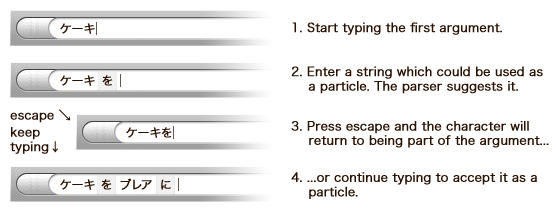
The inspiration for this idea came from Aza’s blog post “Solving the ‘it’ problem” which advocates for this type of quick feedback to the user in cases of ambiguity. Such a method would help both the user better understand what is being interpreted by the system, as well as offer an opportunity for the user to correct improper parses. I just tried mocking up such an input box using jQuery.
➔ Try the User-Aided Disambiguation Demo
If you have any bugfixes to submit or want to play around with your own copy, the demo code is up on BitBucket. ^^ Let me know what you think!
Related posts:
- Ubiquity Parser: The Next Generation Demo
- This week on Ubiquity Parser: The Next Generation
- Scoring and Ranking Suggestions
- How natural should a natural interface be?
- Ubiquity in Firefox: Focus on Japanese
Related posts brought to you by Yet Another Related Posts Plugin.
Tags: ambiguity, arguments, code, interface, Japanese language, JavaScript, jQuery, language, Mozilla Planet, natural syntax, parser, ubiquity
If you enjoyed this post, make sure you subscribe to my RSS feed (optionally with tweets from my Twitter)!
March 14th, 2009 at 6:13 am
Known issues: - the "adjust input widths" algorithm needs some help… perhaps there is a much better approach. - it will pick out particles from "unconverted" Japanese text with a Japanese IME (before the user has made a selection). This could be fixed if there was a way via JavaScript to check whether the user is currently typing in an IME context or not. - does not wrap or extend horizontally well
March 14th, 2009 at 11:01 pm
Impressive work! A few thoughts:
March 14th, 2009 at 11:16 pm
Ah, yes, I left some debug code in there.
I just cleared that up right now. As for the second point—that's interesting. Perhaps we can allow escaping even after some whitespace has been entered… ?
March 16th, 2009 at 4:59 pm
Very nice! Keep the good work
March 16th, 2009 at 5:23 pm
[…] User-Aided Disambiguation: a demo […]
October 14th, 2009 at 1:18 pm
The inspiration for this idea came from Aza’s blog post “Solving the ‘it’ problem” which advocates for this type of quick feedback to the user in cases of ambiguity. It is true, I have just read this article.